
Running your next release on the same machine that serves live traffic feels convenient until it is not. One bad deploy can take down production, corrupt data, or leave you rolling back under pressure with customers already affected. Separating build, staging, and production is not overhead for large companies only—it is how you keep releases predictable when you ship frequently.
What Goes Wrong When Build and Production Share a Server
When CI jobs, container builds, and the live application compete on one host, failures compound quickly. A memory-heavy build can starve the web process. A misconfigured deploy script can overwrite the running binary or restart the wrong service. Disk fills up from old image layers while logs still write to the same volume.
Common symptoms include:
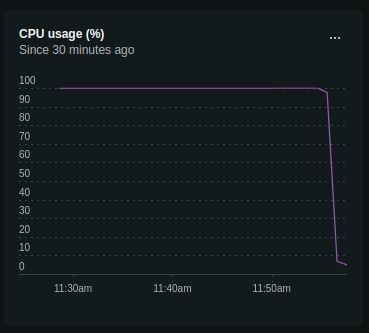
- Resource contention — CPU spikes during npm run build or docker build cause latency spikes for real users.
- Shared filesystem risk — deploy scripts that write to application directories can clobber a running release mid-request.
- Credential sprawl — build tools often need broader access than runtime; one leaked key on a shared box exposes everything.
- No clean rollback path — if production and build artifacts live in the same tree, reverting means guessing which files changed.
The pattern looks fine on a small VPS with low traffic. It breaks the first time you need a zero-downtime release or debug a production incident while a pipeline is still running.
Incident response gets harder when the same shell session mixes production logs and half-finished deploy artifacts. On-call engineers waste minutes confirming which process version is live—a delay that matters when revenue or data integrity is on the line.
Build in CI, Ship Immutable Artifacts
The fix starts in your pipeline, not on the production box. Build the project in CI/CD—ideally into a Docker image or another immutable artifact—so production only pulls and starts a known-good version. That shift changes what a deploy means: instead of compiling on the server, you promote a tested artifact through environments.
What a solid pipeline includes
- Automated tests on every merge to your main branch
- Linting and security scans before the image is tagged
- Versioned artifacts stored in a registry, not rebuilt by hand on the host
- Environment-specific configuration injected at runtime (env vars, secrets manager), not baked into the image for every tenant
Docker helps here because the same image that passed staging is what runs in production. Dependencies, OS libraries, and runtime versions stay consistent. Rollback becomes pull the previous tag and restart, not reconstruct a server from memory at 2 a.m.
Keep build secrets out of production entirely. CI runners should hold registry credentials and signing keys; production hosts need only pull permissions for the specific repositories they serve. That separation limits blast radius when a compromised dependency or leaked env file surfaces during an audit.
Separate Environments Before You Need Them
At minimum, keep three logical tiers: development, staging, and production. Staging should mirror production closely enough that a green deploy there means something—same database major version, similar data volume, comparable network paths to third-party APIs.
Staging checks that catch real issues
- Database migrations applied against a copy of production schema
- Background workers and cron jobs running against staging queues
- Load smoke tests on endpoints that fan out to external services
- Feature flags toggled the same way they will be in production
If staging lives on the same physical server as production, use separate containers, separate databases, and separate ports—but accept that you still share hardware failure domains. A separate staging host or a small second node is cheaper than one bad Friday deploy.
Deploy With Minimal Downtime
Even with good CI, how you swap running instances matters. For a single-node setup, blue-green or rolling restarts behind a reverse proxy beat in-place file replacement. With orchestration (Docker Compose, Kubernetes, or a PaaS), define health checks so traffic only routes to instances that pass readiness probes.
- Health endpoints — return 200 only when the app can reach its database and critical dependencies.
- Graceful shutdown — finish in-flight requests before the old container stops.
- Migration strategy — run backward-compatible migrations before traffic shifts; avoid destructive schema changes in the same release as code that depends on them.
- Observability — log deploy version or git SHA so you can correlate errors with a release within minutes.
These steps reduce downtime from "until someone notices" to "seconds, if any," which is what users and SLAs actually measure.
Pair deploy mechanics with alerting on error rate and latency percentiles for fifteen minutes after each release. A healthy pipeline plus blind production monitoring still lets bad releases linger. Tag releases in your APM or log aggregator so on-call can answer "did this start after the 14:32 deploy?" without grep archaeology.
When a Shared Server Is Still Tempting
Budget and early-stage simplicity push teams toward one box. That is acceptable for internal tools or pre-launch sandboxes—not for revenue-bearing production. If you must colocate temporarily, isolate aggressively: dedicated user accounts, cgroups or container limits for build jobs, read-only production filesystems where possible, and automated alerts on disk and memory.
Plan the exit early: document how you will split CI runners, staging, and production onto separate hosts or managed services. The migration is easier before traffic and compliance requirements grow.
Regulated or enterprise clients increasingly ask where builds run and who can SSH into production. A shared dev/prod box fails those questionnaires and slows sales cycles. Separating environments early is cheaper than explaining incident history during vendor review.
Managed CI (GitHub Actions, GitLab CI, CircleCI) plus a container registry often costs less per month than the revenue lost during a single preventable outage on a overloaded VPS.
Need help untangling a deploy setup that has outgrown a single server? Review your release pipeline with someone who has shipped production systems without betting the live site on one machine.


